
Currently, Interlibrary Loan (ILL) requests are not visible on our website, but you can view your processed requests or ILL items you have checked out by logging in to our Classic Catalog here.
-
General Questions
Your barcode is the 14-digit library card number; it can be found on the back of your library card or by logging into your account and go to My Settings.
Computer reservations can be made in person at your nearest LVCCLD library branch or online.
To reserve a computer, you will need your library card number and PIN.
When making a reservation, please note the location, start time, and computer number for your session.
For more information, click here.
Overdue fines and replacement fees are assessed for damaged or lost items according to the Fines and Fees Schedule, which is subject to change. Overdue fines are assessed from the first day or hour items are overdue on a per item basis. No overdue fines are assessed on paperbacks, magazines, or children’s materials. If the items are not returned, however, a bill for the items, including a replacement fee, will be mailed.
Fines do not apply to eMedia, as titles automatically expire on their due dates.
Fines over $10 or failure to return items will result in suspension of borrowing privileges, and you will be unable to place holds, renew materials, or check out additional materials.
Insufficient funds $25 per returned check Collection agency service fee $10 Overdue items $.25 per day, $4 per item maximum Overdue fine threshold $10 Lost, stolen, or damaged items Full cost of the item plus *processing fee and collection agency fee, if applicable. Interlibrary Loan (ILL) materials Fees vary and are determined by the lending library Lost or damaged Interlibrary Loan Bookstrap $3 Lost or damaged audio-visual case, multimedia bag, insert, or graphic $2 Lost single disc from a set (full replacement may be charged) $10 or full replacement fee Lost or damaged doll case or clothing $30 Lost or damaged hotspot box $4 Lost or damaged hotspot charging block or charging cord $5 Lost or damaged hotspot SIM card $10 Lost or damaged iPad bag $2 Lost or damaged iPad tempered glass screen protector $10 Lost or damaged iPad cover $32 Lost or damaged iPad charging block or charging cord $20 *Processing Fees: These are charges in addition to the full cost of the item if an item is lost or returned damaged.
DVDs, hotspots, iPads, audio-visual instructional titles, and 14–day loan books $10 Other cataloged items $5 Uncataloged items No processing fee You may have up to 25 physical library items on hold, and 25 OverDrive items on hold.
You may borrow up to 50 circulating items on a library card at any one time. Non-traditional library materials and eMedia have varying borrowing limits. Please note that residents of North Las Vegas and Boulder City are subject to the policies and procedures of their library districts.
Anyone who lives, works, attends school, or visits Clark County can apply online for an Instant eCard and immediately enjoy access to millions of digital resources. Individuals who are permanent residents of the Las Vegas-Clark County Library District are eligible for an All Access library card and can apply by visiting any LVCCLD library branch. Individuals without a residential address should visit their nearest library to inquire about access to library services.
The previous LVCCLD.org website was created over ten years ago, and since that time there have been many changes, including how important mobile accessibility is for customers. With such a high volume of use comes a multitude of requests from library customers for improvements and new website features.
Anyone who lives, works, attends school, or visits Clark County can sign up for a library card and be able to stream and download digital books, movies, music, magazines, and more on our website at LVCCLD.org. For more information please visit our borrowing guide: LVCCLD.org/GetCarded
Most forms of assistance for housing, medical bills or personal debt will come from charitable organizations or government assistance programs, rather than grants from foundations.
Immediate resources for funding can be obtained at local government agencies, organizations, and gifts or loans from generous individuals. You might also contact your elected officials to ask about government-sponsored or other programs for which you may be eligible. Please visit any Las Vegas-Clark County Library District branch for more information.
Any Las Vegas-Clark County Library District resident
- with a valid, unexpired library card
- whose account shows no overdue items
- and owes less than $10 in fines or fees
may use the Library District's Interlibrary Loan (ILL) service.
Borrowers who are not Las Vegas-Clark County Library District residents should submit their requests directly to their own Library District. They may request ILL services from the Las Vegas-Clark County Library District, but they
- will be charged a $25-per-item non-refundable fee
- must agree to pay any additional fees assessed by the lending institution
- will be subject to the same eligibility requirements as residents (listed above)
Software cannot be installed on library computers; you can only use software that the Library District has pre-installed on the computers.
Payment can be made in person at any LVCCLD library branch or online. To pay online, log into your account and go to My Borrowing > Fees.
If you are unable to place a hold, your account may be restricted. Your account is restricted if it is expired, if you have fines/fees exceeding $10, or long overdue materials on your account. Staff would need to take a look at your account to determine the reason it might be restricted, so please call your nearest library branch, or contact us for assistance.
For youth under the age of 14, a parent/legal guardian must provide their valid picture ID and proof of address. By establishing an account, the parent/legal guardian accepts financial responsibility as well as responsibility to guide his or her minor child’s use of library resources and materials.
If you are 14 or older, you may present your valid picture ID (school ID is acceptable) and proof of address (report card, etc.) or come into the library with a parent/legal guardian to obtain a library card.
Click here for more information.
Registering on the new website just takes a minute and requires that you have a library card and PIN. If you never established a PIN, enter your library card number here; leave the PIN blank and click submit to enter a PIN.
Click on the blue Log In/ MY LVCCLD button in the top-right corner of the new website. From the drop-down menu, click on the green Log In / Register button.
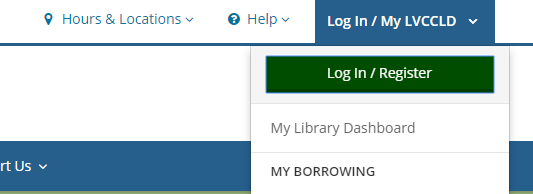
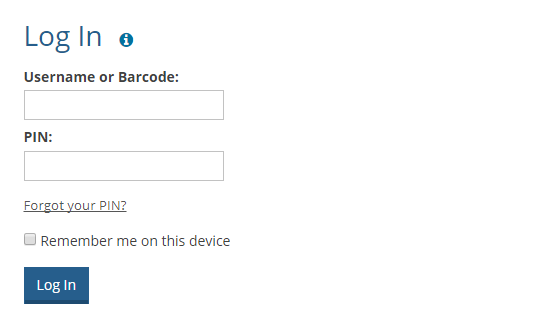
Enter your library card barcode and PIN.
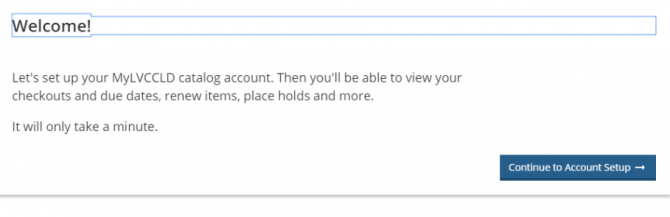
Click the blue Continue to Account Setup button.
Verify that your first name, last name, email address and date of birth are correct. Then click Continue.

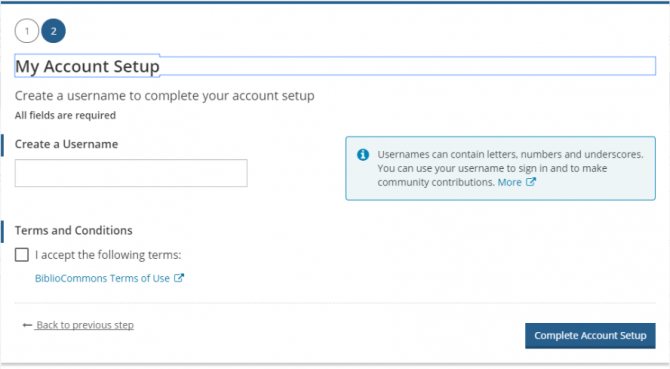
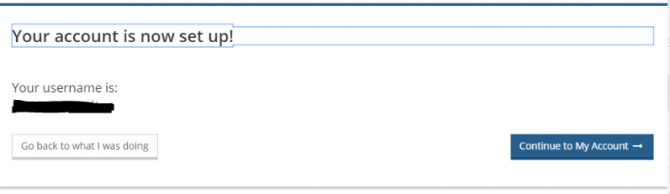
Create a username and check the box next to “I accept the following terms.” Then click Complete Account Setup.
Click Continue to My Account to view the features of our new website and personalize your account!
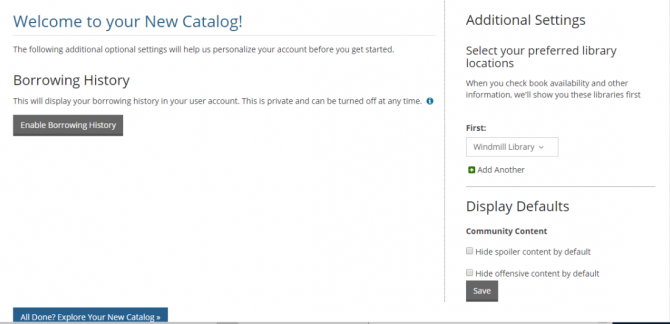
There is an extensive Help section with answers to the most common questions. Or you can contact us if you need additional help.
Online Resources Support
Please fill out the form below with as much information as possible.
"*" indicates required fields
Tablets, smartphones, and e-readers can all be used to download and read eBooks. Devices using Android, Windows, and iOS operating systems are all compatible and among the most commonly used. Blackberry devices no longer support eBook downloads. For a complete list, check out this list.
- Books, conference proceedings, and dissertations
- Photocopies of newspaper and magazine articles
- Obituaries
- Some reference and genealogical materials but only if the lending library will lend them
- Microfilm
Registration is a one-time process that allows you to create an easy-to-remember username that you can use instead of your barcode to check your account. Don't worry! If you prefer logging in with your barcode, you can still do that instead. If you decide that you'd like to post any content (comments, quotes, public lists, etc.), your username is what other library patrons will see. We never show your real name on the website.
All LVCCLD library branches offer free Wi-Fi. We offer two public library networks, “Library Wi-Fi ages 17 and under” for persons under the age of 18, and “Library Wi-Fi ages 18 and over” for persons over the age of 18.
For more information, click here.
You will be charged a replacement cost as well as a processing fee and collection agency charge (if applicable). Once paid for, the item belongs to you.
If you find the item within 90 days of the date it was paid for, and it is in usable condition with all parts intact, you can obtain a refund by bringing the item and the original receipt for payment to any LVCCLD library branch.
You will receive an email when your hold is ready for pickup. If you do not have an email address on file, you will need to check online, call your nearest library branch, or contact us for assistance.
Library materials belonging to the Las Vegas-Clark County Library District (LVCCLD) can be returned to any LVCCLD library branch. Please do not return LVCCLD library materials to Henderson Libraries or a school library, as these organizations are not associated with LVCCLD.
The loan period depends on the type of material, most of which can be found in the chart below. Non-traditional library materials and eMedia have varying loan periods. Please note that items belonging to Boulder City and North Las Vegas Libraries are subject to the policies and procedures of their library districts.
Material Type Loan Period Books 21 days New Books 14 days Magazines 21 days Paperbacks 21 days AudioBooks 21 days CDs 21 days DVDs (1-2 discs) 7 days DVDs (3+ discs) 14 days Hotspots 21 days Interlibrary Loan Varies according to lending library If you do not have a current Nevada address, you may visit your nearest library to apply for a guest library card by providing a valid picture ID and current out-of-state address. The guest card will expire three months from the day the card is issued and will provide access to library materials and public computers. Please visit our borrowing guide for more information: LVCCLD.org/GetCarded.
Yes. You'll see the option to renew a title three days before it's set to expire. A "Request again" button will appear under the title on your Loans page.
You may check out up to 50 titles per month (can include any combination of eAudiobooks and eBook) and the loan period is up to 3 weeks. You can set shorter default loan periods by changing the settings in your OverDrive account. Everything is returned automatically and there are never any late fees.
Foundations do not make grants to for-profit businesses.
If you are seeking funds to start a for-profit business, please see Where can I find funding for my business? or SBA's Finding and Attracting Investors video series.
To cancel an ILL request, please contact the ILL office at: 702.507.6306 or ill@thelibrarydistrict.org.
If the item has been shipped by the lending library we will be unable to cancel the request until the item arrives. Please note that the item will remain attached to your account until it arrives, and will be counted as one of your five active requests.
All LVCCLD library branches offer laptops for use within the library. You must be a Clark County resident, have a full-service library card in good standing (fines/fees below $10), and present a valid photo ID to check out a laptop.
Children under the age of 18 must have parental permission and present their library card with a red “I” sticker to check out a laptop.
Laptops are available on a first-come, first-served basis, are available for a two-hour checkout period, and should not be left unattended at any time.
To renew library materials, log into your account and go to My Borrowing>Checked Out.
You can also renew materials by calling or visiting any LVCCLD Library branch.
Holds will remain at your pickup location for one week. We are unable to extend the amount of time an individual hold is kept; this ensures everyone receives their holds in a timely manner.
Library cards expire on a regular basis; please ask for your library card’s expiration date at any LVCCLD library branch or view it online in your account settings. If we have your email address on file, you will receive an email letting you know your library card expiration date is approaching.
Please visit your nearest LVCCLD library branch to renew a library card. Cards may be renewed if all outstanding fines and fees are paid in full. To renew, we require a valid picture ID and proof of current address.
Unless out-of-state or unverified, cards established or renewed in 2020 will expire on 01-01-2025. Unless out-of-state or unverified, cards established or renewed in 2021 will expire on 01-01-2026. Out-of-state cards expire in one year and unverified cards expire in 30 days.
If you forgot your PIN and have an email address on file, you can receive an email containing further instructions to reset your PIN.
Your PIN is a 4-8 digit number used in conjunction with your library card to access library resources, including your account information online. To change your PIN, log into your account and go to My Settings.
If you forgot your PIN and have an email address on file, you can receive an email containing further instructions to reset your PIN.
If you never established a PIN, enter your library card number here; leave the PIN blank and click submit to enter a PIN.A replacement library card will not affect current eBook or eAudiobook checkouts. However, if you have an eBook or eAudiobook wishlist or holds, you will need help to move them to your new library card. Please contact us with your new library card.
Ask a Librarian
"*" indicates required fields
Most OverDrive ebooks and e-audiobooks can be returned early. Find step-by-step instructions on OverDrive Help: Early Return.
To return Kindle titles early, log in to your Amazon account and click "Your Content and Devices." Find the title you'd like to return and return it using the "Actions" menu.
You can have up to 25 holds on OverDrive titles.
A nonprofit organization is formed for the purpose of serving a scientific, literary, education, artistic or charitable purpose and not for the pursuit or accumulation of profits. A nonprofit is not a way for ordinary businesses -- or people -- to shield assets or avoid paying income tax. It is not an alternative business form for any regular type of business.
Interlibrary loan materials cannot be renewed. You are responsible for any overdue fines or fees incurred if an item is kept past the due date.
Please visit the library branch you selected as the pickup location for your hold; this is also known as your home library. Items are filed on the holdshelf by the last four letters of your last name and the first three letters of your first name.
If you are unable to renew an item, someone else may have the item on hold, or your account may be restricted. Your account is restricted if it is expired, if you have fines/fees exceeding $10, or long overdue materials on your account. Staff would need to take a look at your account to determine the reason it might be restricted, so please contact us for assistance.
If you lose your library card or keychain, please call any LVCCLD library branch or email us at ask@thelibrarydistrict.org as soon as possible.
Please visit any LVCCLD library branch with valid picture ID to replace your library card.
Our new website is built on a new platform. In order to take full advantage of everything our new website can do, all library card holders need to register their barcode number to create an account and set a unique username. An easy-to-remember username gives you quick access to your account if your library card isn’t handy. After you register, you can log in with either your username or your library card number, whichever you prefer.
There are also new social features, such as posting ratings, reviews and lists, that you must be registered to take advantage of, but these are completely optional.
A few of the new benefits include:
Shelves: Keep track of your reading with For Later, In Progress and Completed shelves
Lists: Make lists of recommendations on any topic you like
Ratings and Reviews: Share what you think about anything in the collection
Profile: Set up a personalized profile to share your recommendations. You can also choose to follow other users if you like their lists and reviews.There is an extensive Help section with answers to the most common questions on the hoopla site. Or you can contact us if you need additional help.
Online Resources Support
Please fill out the form below with as much information as possible.
"*" indicates required fields
You can check out up to 10 titles a month on hoopla, and titles can be any combination of ebooks, e-audiobooks, music, TV, and movies.
How long can I borrow them?
- Most movies and TV episodes can be borrowed for up to 72 hours.
- Most music albums can be borrowed for 7 days.
- Most ebooks, e-audiobooks, and comics can be borrowed for up to 21 days.
Starting a nonprofit organization takes time and effort. It is not something that can be done in a weekend. A nonprofit organization is a separate legal entity, created by filing Articles of Incorporation with the Nevada Secretary of State. For more information on the steps required, see Starting a Nonprofit Organization.
Some essential elements in starting a successful nonprofit include (but are not limited to) a reason to exist, high-quality, unduplicated programs/services and reliable and diverse financial revenue.
For more information on the steps required, see Nolo's How to Form a Nevada Nonprofit Corporation. Determine your readiness to start a nonprofit by completing Candid's Nonprofit Startup Assessment Tool.
Please note: Interlibrary Loan (ILL) requests are not visible on our website, but you can view your processed requests or ILL items you have checked out by logging in here.
Books are obtained via WorldCat. Please note that we are unable to process ILL requests for items we own. Follow the steps below to place an Interlibrary Loan (ILL) book request.
- Click the Book Request link and enter your library card number and PIN
- Click on the WorldCat.org link
- Select the Books tab and enter your search term(s)
- Select your book and view the libraries owning a copy based on your zip code. If Las Vegas-Clark County Library District is not listed, the item can be requested.
- Review the item details to ensure this is the item you want. Please pay special attention to the "Edition/Format" field. This tells you the format of the item, i.e. large print, regular book, etc.
- Once you have found your book in WorldCat, enter the author's name, title of the book, place and date of publication, ISBN number (if applicable), and the OCLC number for the book on the ILL request form.
- Is an alternate edition acceptable? Enter 'yes' or 'no' in the corresponding box to help us find your item.
- Would you still like the item if it can only be used in the library? Enter 'yes' or 'no' in the corresponding box to let us know.
- Enter a need by date if you need it by a certain date (it will take at least 2-3 weeks, and up to 4 weeks to obtain the item).
- Click Submit This Request
Yes, you can change the pickup location for a hold that is not “In transit” or “Ready for pickup.” To change the pickup location, log into your account and go to My Borrowing>On Hold and choose a location from the “Pickup at” drop-down menu.
To update your address, please visit any LVCCLD library branch. You will need to present valid picture ID and confirmation of your new address. If the new address is not listed on your picture ID, please bring confirmation such as a current utility bill, lease agreement, or auto insurance or registration.
You can access our catalog at any time by clicking on the Search bar located at the top center of the website. You can then use the drop-down menus to refine your search, or click on the Advanced Search button to filter by format, library location, availability and more.
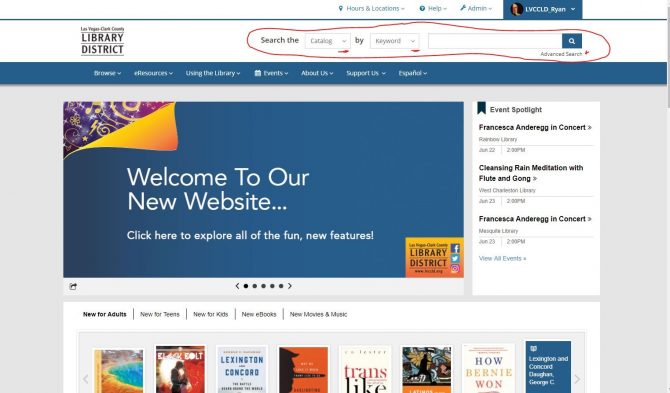
Once you conduct a search in the search field, you’ll be taken to a search results page with filters are on the left-hand side. At the top of your results, you can either see each item by itself (a.), or group items together by title (b.), which keeps books, audiobooks, etc. all under one heading.
a.

b.
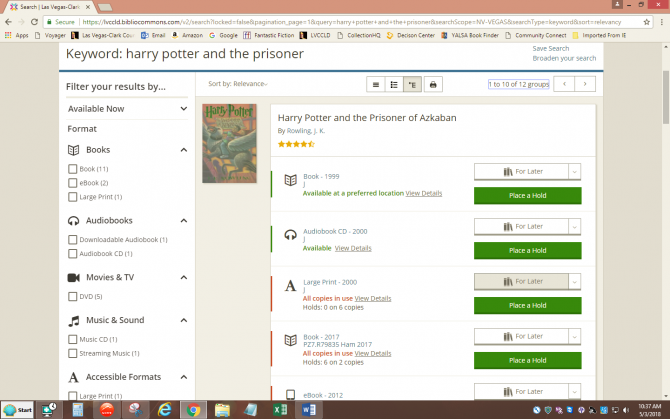
(The other two options are List View, which has no pictures, and Print.)
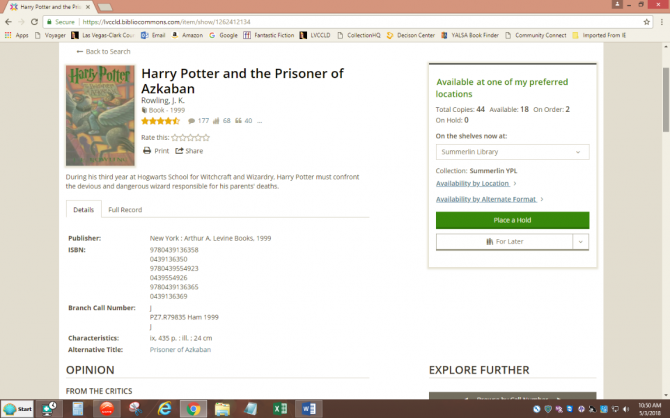
Click on the format of the item (in this case, book) to view more information about that title. From here you see reviews, ratings, availability, and other book information.
There is a help page for viewers with answers to the most common questions. Or you can contact us for additional help.
Online Resources Support
Please fill out the form below with as much information as possible.
"*" indicates required fields
You have 30 tickets each month to watch movies on kanopy. See the number of tickets and the access period for each title next to the play button.
Titles will take anywhere from 1 to 5 tickets with major studio movies, TV seasons, and longer-playing titles costing more tickets and regular movies and shorter-playing titles costing fewer tickets. The number of tickets will reset at the first of the month.
To be tax-exempt under section 501(c)(3) of the Internal Revenue Code, an organization must be organized and operated exclusively for the purpose of serving a scientific, literary, education, artistic or charitable purpose. In addition, none of its earnings may be returned to any private shareholder or individual. Additionally, it may not attempt to influence legislation as a substantial part of its activities and it may not participate in any campaign activity for or against political candidates.
A nonprofit organization applies for tax-exempt status with the Internal Revenue Service (IRS). Please note that it can take 2-6 months for the IRS to return its decision. It is to the organization's advantage to take the time and effort required in filling out the IRS Form 1023, rather than the IRS Form 1023-EZ.
For more information, see Internal Revenue Service (IRS) Application Process.
It can take up to four weeks to receive an Interlibrary Loan (ILL) item. There are many factors that influence this including location of the lending library, method of shipment, etc. Most libraries ship items via the US Postal Service.
Some materials (genealogy, local history, reference, microfilm, rare items, etc.) may be difficult to obtain. It may take longer than four weeks to receive these types of items.
Yes, you can pause a hold that is not “In transit” or “Ready for pickup.” While the hold is paused, you will continue to move ahead on the waiting list, but the hold will not be sent to your pickup location while it is paused. This option can be used to manage holds while you are away.
To pause a hold, log into your account and go to My Borrowing>On Hold.
LVCCLD sends email notifications as a courtesy when a hold is “Ready for pickup,” three days before an item is due, ten days after the due date of an item, and a bill for lost or long overdue items.
To receive email notifications, an email address needs to be on file. An email address can be added to your account in person at any LVCCLD library branch or online. To add an email address online, log into your account and go to My Settings.
Please add notices@thelibrarydistrict.org to your email address book to assist delivery of notifications.
Yes. The new website will go live on June 19, 2018, but the old catalog will remain accessible for a few months to ease the transition. We hope you will come to love the new catalog just as much, if not more, than the previous one!
There is an extensive FAQ section on the OverDrive website.
There is an FAQ section on the Fliptser website, too.
Or you can contact us here for additional help.
Online Resources Support
Please fill out the form below with as much information as possible.
"*" indicates required fields
Check out as many digital magazines from OverDrive as you like. Magazine checkouts don't count against your ebook and audiobook checkout limit.
The IRS requires that the majority of tax-exempt organizations file an annual informational return using one of three versions of Form 990.
Most tax-exempt organizations with annual assets under $50,000 will file the Form 990-N. It is an eight question form and only available online. For more information, see Form 990-N (e-Postcard) Internal Revenue Service.
Checkout periods are determined by the lending library. There may also be additional limitations required by the library which may include "In library use only".
Please make every effort to return the items by the due date. Overdue charges accrue on materials borrowed through Interlibrary Loan (ILL) at the rate of $.25 per day per item until is the item is returned. If a long overdue ILL item is returned after the Library District has paid the lending library for the item, we are unable to waive the cost of the item. Customers are responsible for all fines and fees assessed in this case.
If we do not own an item you are interested in, you may be able to request it through Interlibrary Loan (ILL). ILL searches available books, magazines, or periodicals at libraries across the United States.
You may update your email address in person at any LVCCLD library branch or online. To change your email address online, log into your account and go to My Settings.
Yes, once you have registered your account on the new website, you will be able to view your holds and more!
There is an extensive FAQ section on the Freegal website. Or you can contact us here if you need additional help.
Online Resources Support
Please fill out the form below with as much information as possible.
"*" indicates required fields
You can download up to 6 songs a week, and stream 3 hours per day.
Foundation Directory Online is our searchable database that provides comprehensive and accurate information on U.S. funders and their grants. This database is available from a public computer located within Clark County Library.
Interlibrary Loan notifications are sent via email. If you do not have an email address on file, please check My Account for the status of the request.
Email notification that an ILL item is 'In Transit' from the ILL office to your home library will be sent once the item has been processed. Please check with your home library 2-3 days after you receive this notification as our system is unable to generate a second notification.
If the ILL office is unable to obtain the requested item, notification that the request has been cancelled will be sent via email.
No, the Las Vegas-Clark County Library District website does not record your borrowing history.
The Las Vegas-Clark County Library District works with a variety of vendors to provide different services to the community. The vendors are bound by agreements with the Las Vegas-Clark County Library District to ensure your borrowing information is kept confidential. Vendors who work with Las Vegas-Clark County Library District treat your information as the District would. They do not disclose it or share it, and they will only release it to law enforcement under warrant. Your reading history is not visible to the BiblioCommons company that maintains the District’s website.
Registration on the new website is required so that you can view and interact with your information in the new system. If you decide to create lists, comment on titles, or add things to shelves in the new website, (which is completely optional), that data is stored by BiblioCommons, but they are bound by our confidentiality agreement with them.
- Borrowing information including checkouts and holds are always private.
- Other information that is always private: Account information (name, address, email, phone, fees owed), card number and password/PIN, private notes and personal tags on catalog records.
- Shelves are defaulted to share publicly, but nothing is ever automatically added to a Shelf. Items only appear on Shelves if you add them.
- All posts that are public (comments, ratings, age suitability, etc.) are pieces of content that are meant for sharing to assist other users in making choices about what they'd like to read and to encourage community-building through the library.
- All pieces of content that are public (including Shelves) are only ever shared under a username, never a user's real name. The only way anyone would know a user's real name on the library website is if they've included it in their username (which they are always able to change) or if they've included it in the piece of content.
The library catalog complies with COPPA requirements meaning that anyone under the age of 13 cannot post free text (for example, a comment or a quote) without parental consent and cannot choose their own username (it's generated for them using a color, an animal and a number).
The Southern Nevada Nonprofit Information Center offers the Foundation Directory Online Professional in person at the Clark County Library. There is no charge to access this database. This database can only be used in the library.
The Interlibrary Loan (ILL) office can be reached by phone at: 702.507.6306 or by email at ill@thelibrarydistrict.org.
Office hours are 9:00 a.m. to 5:00 p.m. Monday through Friday.
For a comprehensive overview of the proposal writing process, see Candid's How do I write a grant proposal?.
If there is an account balance of $10 or more, or the account already has 5 active Interlibrary Loan (ILL) requests, you will be unable to place a request for ILL materials.
If you already have a library card and need to recover your library card number, please fill out this form.
If you do not already have a library card, click here to apply now.
For further assistance, please visit your nearest library, or email us at ASK@LVCCLD.ORG.
Materials that have been requested are placed in a designated self-service area so patrons are able to pick up their own materials without waiting in line for a staff member to retrieve the items. Items are shelved with a slip attached to their spine that displays the first four letters of the patrons’ last name and the first three letters of the patrons’ first name for identification purposes. Patrons also have the option of selecting an alias which can be used instead of the last and first name letter sequencing. Printed lists are not kept of patron materials awaiting pick up in a self-service area. General correspondence, including comment cards that may contain names and/or contact information submitted by library patrons, are retained for one year in accordance with the Local Governments Records Retention Schedule.
Use the steps below to browse and recommend digital titles that our library does not own.
1. Search for the title in the Libby app.
2. If you find the title you're interested in and it has a "Notify Me" button on the search results page, tap or click that button to recommend the title to the library. If the title is not visible on the search results page and there are fewer than 100 results, tap on the "Deep Search" button at the bottom of the page. This will search titles that match your search query but are not in the library's collection.
Note: If there are more than 100 results, please try conducting a more specific search using the book's full title and the author's name. If you still cannot find the title, it may not be available for purchase or might not have been published in a digital format.
3. If the library purchases the title, you will receive a notification and can either borrow it (depending on availability) or place it on hold.
Please keep in mind that when you suggest a title to the library, there is no guarantee it will be purchased.
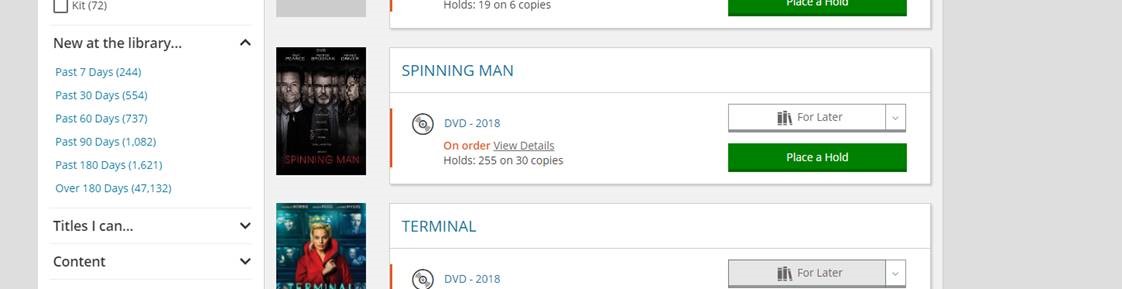
The website allows you to search what's been added to the catalog in the past 7, 30, 60, 90 and 180 days. Once you enter your search term, for example, DVD, look to the left side to select a period of time.
Staff lists are swapped out regularly on our homepage, but if you would like to find archived lists, you can try one of the following methods:
1. Check out the Staff Picks channel archive.
Click on the grey box that reads STAFF PICKS at the bottom of the LVCCLD.org homepage. You'll be taken to a page of staff lists that have previously been featured on that section of the homepage:

2. Follow staff accounts in the catalog.
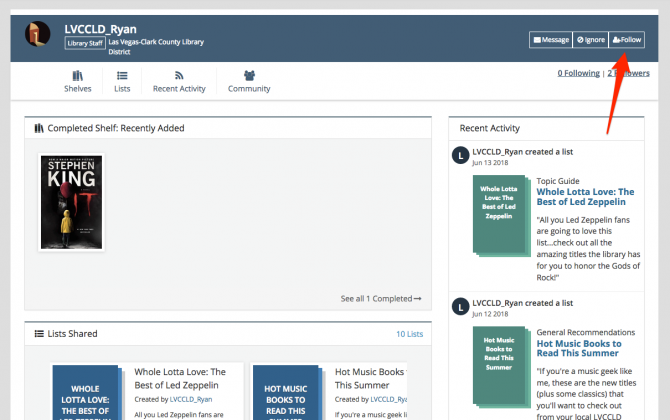
If you see a staff list that you like, clicking on the username of the staff member that created it will allow you to see all previous public lists created by that user. You can follow these profiles to more easily see when they post new lists:
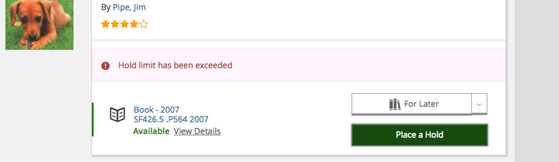
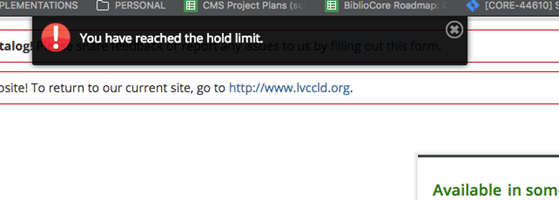
You may place up to 25 holds on your account at a time. If you go over the limit, you will receive the following notification. You are allowed additional holds on our eResource services such as OverDrive and Hoopla Digital for eBooks and downloadable audiobooks.
This site enables large numbers of users to contribute content. The reporting system allows other users to identify inappropriate comments, lists, and other community-created content that contains spoilers or offensive content, or violates the Terms of Use, while preserving everyone’s ability to express themselves. Reporting inappropriate content is referred to as flagging.
Types of Community-Created Content You Can Flag
You can flag any of these types of content:
- Comments
- Quotes
- Notices
- Summaries
- Videos
- Lists
How Flagging Works
If two people report a single piece of posted content as containing spoilers, the comment will be automatically flagged as contains spoilers.
If three people report a piece of posted content as containing offensive material it will be automatically flagged as contains offensive materials. In both of these cases, the comment will not be removed, but you can go to My Settings and have content of these types hidden by default.
If three people report a piece of posted content as a violation of the Appropriate Use Standards, the flagged material will be reviewed against the Terms of Service. If it is determined that the content violates the Appropriate Use Standards, the content may be removed, depending on the home country of the author and of the users flagging the material.
Flag Type# of FlagsActionSpoiler2 Displays spoiler alert.Offensive material3Displays offensive material alert.Violates Terms of Use3Potentially removed, depending on country of creator and report.► To report an inappropriate comment
- Log in to your account.
- On a title’s details page, find the comment you want to report.
- Click the flag icon below the comment.
- Choose whether you would like to report the content as offensive, contains spoilers, or violates appropriate use standards
-
If you report content as offensive, add a brief explanation about what you find objectionable.
- If you report content as violating the appropriate use standards, you will be asked to confirm that you have reviewed the appropriate use standards.
-
- Click Submit to send your note.
Notes:
- Reporting is anonymous. The author of a flagged comment will not know who objected to it, and there is no indication on the comment itself that it has been flagged.
- You can also report inappropriate lists.
- You can’t flag inappropriate usernames or tags, but you can report these to your library
- Borrowing information including checkouts and holds are always private.
- Other information that is always private: Account information (name, address, email, phone, fees owed), card number and password/PIN, private notes and personal tags on catalog records.
- Shelves are defaulted to public, but nothing is ever automatically added to a Shelf. Items only appear on Shelves if you add them.
- All posts that are public (comments, ratings, age suitability, etc.) are pieces of content that are meant for sharing to assist other users in making choices about what they'd like to read and to encourage community-building through the library.
- All pieces of content that are public (including Shelves) are only ever shared under a username, never a user's real name. The only way anyone would know a user's real name on the library website is if they've included it in their username (which they are always able to change) or if they've included it in the piece of content.
The library catalog complies with COPPA requirements meaning that anyone under the age of 13 cannot post free text (for example, a comment or a quote) without parental consent and cannot choose their own username (it's generated for them using a color, an animal and a number).
Yes, copiers are available. Black and white copies are $.10 (ten cents) per page, color copies are $.50 (50 cents) per page, and scans are $.05 (five cents) per page.
The Las Vegas-Clark County Library District (LVCCLD) will proctor exams and tests for a fee for any individual taking distance education or online courses through institutions of higher learning, or as required by a company for prospective employment. The fee is $25 and proctoring service is by appointment only. Please note that LVCCLD is not an official testing center and cannot guarantee a distraction free space. Branch libraries will offer proctoring services based on the availability of personnel, facilities, and technology to do so. Testing institutions and test takers must abide by LVCCLD proctoring guidelines. - No same day appointments can be accommodated.
Urban branches:
- Public fax machines can only send faxes and are not equipped to receive.
- The two options to send a fax are:1 - Library Document Station (Available at select libraries)
- $0.50 per side of a page
- Powered by Envisionware these stations will allow you to use funds from the Print Account on your library card.2 - FAX24 Self-Service Kiosks (Available at select libraries)
- $1.75 for the first side of a page and $1.00 for each additional side of a page
- Self Service Kiosks accept Visa, MasterCard, AMEX, and Discover credit and debit cards only.Outlying branches:
- $0.50 per side of a page
- Patrons can only pay via cash or check.The Windmill Library is able to process passport applications for first-time applicants. We offer standard and expedited processing. The expedited process costs an additional $60.00 per application. This office DOES NOT issue passports, but will send your passport forms to a regional passport agency to be processed. For additional Passport Acceptance Facilities please visit the State Department’s Passport Acceptance Facility Search Page. For more information about Passports or to schedule an appointment at Windmill Library please visit our Passport Services page.
Most urban library branches have one or two small, private study rooms, available on a "first come/first served" basis.
Please check with your library directly for their specific study room rules and time limits.
The library offers ESL classes through the Adult Learning Program. They're free. Please call 702.507.3446 for more information.
HSE classes and testing are available from the following:
The library offers HSE preparation classes through the Adult Learning Program. They're free. Contact 702.507.3446 for more information on how to register for classes or the HiSET exam.
Clark County School District's Adult High School.
Contact the Career Development Center, 2701 East St. Louis Ave. Call 702.799.8650.CSN Charleston Campus Testing Office, 702.651.5733
CSN Cheyenne Campus Testing Office, 702.651.4050Yes, the Library District's Adult Learning Program has ESL classes and HSE test preparation classes.
Citizenship preparation is available from the following:
The Citizenship Project – 710 W Lake Mead Blvd., 89030 702.868.6002
Call 702-507-3446 or 702-507-3538 for more information.
Please fill out the Suggest a Title form.
Read the Library District's information sheet which has the information you need to market your publication to the Library.
No, you cannot serve your court ordered community service hours at the library.
You can call HELP of Southern Nevada at (702) 369-4357. They can help you find an acceptable location.
Be sure to visit their website to see what information they'll need to help you.There are a couple of ways to volunteer at the library. The Library always welcome your help!
Many of the library branches also get a lot of help from volunteers. Volunteers can help in our used bookstores, warehouse, shelve cds and other routine tasks. Please call your library and ask for the volunteer coordinator, who will be able to tell you if there are any volunteer openings and the requirements, or send an email to valdesl@thelibrarydistrict.org.
If you need to perform Court Ordered community service, you cannot do that at the library.Exhibit request packets must contain the following:
• Letter of Request: Written statement of request to exhibit with the library galleries. Please describe the proposed exhibit.
• 10-20 Images: Digital images should be saved as .jpg files and be named in the following format: Last name_first initial_title_year_medium_dimensions in inches.jpg
Example: Picasso_P_Guernica_1937_oil on canvas_137x305.jpg• Artist Statement: Anything the artist would like to share about their art (e.g. concept, subject matter, medium, process, etc.)
• Artist Resume: This should include all contact information (name, mailing address, phone number, and email), list of previous exhibits, art awards/honors, and an optional bibliography and website address.Request packet may be submitted via email or mail.
Emailed requests:
Supporting documents and images should be emailed to johnsond@thelibrarydistrict.org with “EXHIBIT REQUEST (your first and last name)” in the subject line. Image files attached should be named in the above format and file size should be a maximum of 1-2MB each. Please send entire submittal in one email. Alternatively, all of the above packet items may be submitted in a single PDF file.Mailed requests:
Packet should include .jpg images and supporting documents saved on CD or USB flash drive (please also include printed hardcopies of supporting documents and 2 images). Packet materials will not be returned.Mail packet to:
Windmill Library Service Center
ATTN: Darren Johnson - Gallery Services
7060 W. Windmill Lane Las Vegas, NV 89113Yes. The Library District offers meeting rooms of various sizes at 14 branches that can accommodate anywhere from 12-160 people. For your convenience, meeting room requests can be made on our website. You can also rent one of our Performing Arts Centers located at the Clark County, Summerlin, West Charleston, West Las Vegas and Windmill Libraries at a rate of $40 per hour, plus additional fees for technicians and security. For more information about Performing Arts Center rentals please contact one of Performing Arts Centers directly.
The Library District is always happy to take donated books, magazines, DVDs and CDs. Items will be sold in one of the Library's Used Bookstores. All proceeds are used to support the Library District's services and programs.
Take your donations to the front desk of your library. The staff can give you a receipt for your taxes.
Most of our online resources are available anywhere with your library card. Our online resources are available to residents within the Las Vegas-Clark County taxing district. This does not include North Las Vegas, Boulder City, and Henderson.
¡Todos los servicios bibliotecarios son totalmente GRATIS! La única vez que tendrá que pagar es cuando quiera imprimir algo, pagar una multa o comprar un libro usado.
La Red es un valioso recurso de información que provee información al día sobre una serie de temas. Las estaciones de computadoras constan de acceso a la Red y están disponibles para el uso al público en todas las sucursales. También se cuenta con servicio WIFI en las bibliotecas. Además de la Red, usted puede tener acceso a numerosos recursos electrónicos de información especializados. Para poder usar una computadora tendrá que hacer una reservación para confirmar su tiempo en la computadora. Este proceso lo puede hacer a través de cualquier computadora. Para más información, consulte con el folleto Uso de la Red en la Biblioteca.
Para utilizar una computadora en la biblioteca usted necesitará:
1. una tarjeta de una de las bibliotecas de Nevada y un número de identificación personal o PIN
2. los visitantes pueden obtener una tarjeta temporal válida por 7 días
3. usted también puede utilizar una Estación Express de 15 minutos que no requiere identificación, no hay impresora disponible.Este servicio existe solamente en inglés.
Recursos especiales para niños existen en todas las bibliotecas. Nuestras bibliotecas ofrecen horas de relato de cuentos para introducir a los niños y sus padres, a sus tutores o aquellos que los cuidan, al excitante mundo de los libros. También presentan programas especiales y eventos como nuestro Programa de Lectura de Verano. Además celebramos y observamos el Día de los Niños, el Mes Nacional de la Herencia Hispana, el Día de los Muertos y mucho más. Tenemos libros, DVDs, libros en DVD, revistas y otros artículos más populares en muchos idiomas. Estaciones de trabajo filtradas con acceso a la Red están disponibles para jóvenes menores de 18 años en todas las áreas de las Bibliotecas para Gente Joven. Para más información, consulte con el folleto Una Guía para Padres Utilizar la Biblioteca.
Muchos grupos comunitarios utilizan las salas de junta de la biblioteca para compartir información con sus miembros o el público en general. Para reservar una sala de juntas para su grupo comunitario u organización, llame o visite la sucursal más cercana.
Hay tiendas de libros usados localizadas en la mayoría de nuestras bibliotecas. Para participar como voluntario, llame al 702 507 3597. Para donar libros, hable con el personal de su biblioteca más cercana.
El programa voluntario para Asistencia en el Analfabetismo en Computadoras de las Bibliotecas, conocido como CALL, ofrece asistencia gratuita sobre educación básica para adultos, analfabetismo en inglés e inglés como segundo idioma en todas las sucursales urbanas. Si usted quiere ser un voluntario para el programa o quiere más información, por favor llame a la oficina del programa CALL al 702.507.3538.
Las multas por retraso se calculan desde el primer día de retraso por cada artículo. No se calculan multas de retraso en libros de bolsillo, revistas o materiales de niños. Tener multas de más de $10 dólares o no regresar artículos resultará en la suspensión de los privilegios de préstamo. Para más información, consulte el folleto Su Guía para Servicios Bibliotecarios Gratuitos.
El límite de préstamos es de 50 artículos. Para incrementar la disponibilidad de nuevos artículos populares, usted puede sacar hasta 7 DVDs populares y 7 nuevos libros. Estos artículos serán circulados con periodos de préstamo más breves.
Los periodos de préstamo son:
Libros, revistas y folletos 21 días
Videos, casetes, CDs y artículos audiovisuales 21 días
Nueva ficción o artículos en gran demanda 14 días
DVDs populares 7 días
Para incrementar la disponibilidad de nuevos artículos populares, usted puede sacar hasta 7 DVDs populares y 7 nuevos libros. Estos artículos serán circulados con periodos de préstamo más breves.Si usted es menor de 14 años, un padre o tutor debe proveer una identificación y firmar la solicitud.
Usted puede solicitar una tarjeta de la biblioteca en persona en cualquier sucursal o completando la solicitud en línea. Muestre una identificación con fotografía, nombre y domicilio actual en Nevada. Si usted no tiene alguna identificación para verificar su dirección actual se le enviará la tarjeta por correo.
Todas las bibliotecas están abiertas siete (7) días a la semana, todo el año, menos los días festivos. Los horarios son:
Lunes – Jueves 10 A.M. – 7 P.M.
Viernes – Domingo 10 A.M. – 6 P.M.La misión de la biblioteca dice: "Nosotros proporcionamos recursos para permitir a la gente en nuestra comunidad buscar un aprendizaje durante el transcurso de su vida a través de nuestras colecciones que responden a sus necesidades, recursos electrónicos y servicios innovadores. Nuestras bibliotecas públicas incitan a sus uso y son piezas vitales de nuestras diversas comunidades donde niños y adultos pueden experimentar enriquecimiento personal y conectarse unos con otros". Los servicios ofrecidos por la biblioteca incluyen:
- libros, revistas, DVDs y música en inglés y español
- recursos electrónicos que incluyen artículos de texto completo, enciclopedias, noticias y base de datos
- si usted se encuentra confinado a su casa, usted puede calificar para recibir materiales de la biblioteca en su hogar
- el servicio de préstamos ínter bibliotecarios se provee a los residentes para obtener materiales que no están disponibles en las bibliotecas locales
- durante el año se presentan programas especiales en la biblioteca. Todos los programas patrocinados por la biblioteca son gratuitos y la entrada está abierta al público
- clases y recursos para aprender inglés
- colecciones especiales
- secciones y programas para niños
- computadoras para niños y adultos
- y mucho más
La privacidad es esencial para el ejercicio de la libre expresión, el libre pensamiento, y la libre asociación. En el Distrito Bibliotecario de Las Vegas-Condado de Clark el derecho a la privacidad significa el derecho a solicitar información abiertamente sin que otros examinen o inspeccionen el motivo del interés propio. Existe confidencialidad cuando una biblioteca se encuentra en posesión de información personal identificable acerca de los usuarios y mantiene su información como privada.
La Política está disponible en su totalidad en el sitio de la Red o puede obtenerse a través de un empleado.
The majority of government grants are awarded to eligible nonprofit organizations, not to individuals. Government grants nearly always have stiff reporting requirements. Careful record keeping is a must, since an audit is always a possibility.
Individuals looking for government grants and loans should visit Benefits.gov, which is the official government benefits website. This site allows you to complete a confidential questionnaire and receive a list of programs that may apply to your situation.
For a comprehensive overview of the proposal writing process, see Candid's Where can I find information on corporate giving?.
Our Library District is accountable for the materials borrowed from other libraries; our privilege of borrowing materials from them may be jeopardized if items are damaged or lost.
Customers are responsible for damage/loss of ILL items which may include a processing fee. If an item is damaged or lost, please notify the ILL staff at 702.507.6306 or ill@thelibrarydistrict.org. ILL staff will contact the lending library and provide you with the amount owed.
Lost or damaged ILL bookstrap will result in a $3 charge.
Borrowing privileges with the Las Vegas-Clark County Library District will be suspended until all related fees are resolved. Multiple instances of lost or damaged ILL items may result in the loss of ILL privileges.
Unpaid balances for lost or damaged ILL items may be referred to a collection agency; in these cases, a $10 nonrefundable fee will be added to the account.
Interlibrary Loan (ILL) items are picked up at your home library. Our courier service may take several days to deliver an item from the central ILL processing center to your home library; we recommend calling the home library to ensure the item has arrived and is 'Ready for Pickup'.
ILL items should be returned to the service desk from which they were checked out. We recommend obtaining a return receipt when you return the item. If for some reason the item does not make it back to the ILL office you will need this receipt to show the item was returned. Please leave the ILL bookstrap on ILL items, and return ILL items to the service desk from which they were checked out.
A borrower may have up to five (5) *active requests at any given time.
*Active applies to a request from the time the request form is submitted until the item borrowed is returned to the library.
There is no charge for ILL services for Las Vegas-Clark County Library District residents.
Non-Library District residents will be a charged a non-refundable fee of $25 per item and any additional fees assessed by the lending institution.
The copyright law of the United States (Title 17, United States Code) governs the making of photocopies or other reproductions of copyrighted material.
Under certain conditions specified in the law, libraries and archives are authorized to furnish a photocopy or other reproduction. One of these specific conditions is that the photocopy or reproduction is not to be "used for any purpose other than private study, scholarship, or research." If a user makes a request for, or later uses, a photocopy or reproduction for purposes in excess of "fair use," that user may be liable for copyright infringement.
The Library District reserves the right to refuse to accept a copying order if, in its judgment, fulfillment of the order would involve violation of copyright law.
If an item cannot be found at WorldCat.org, we suggest you verify the information you have with another source. Try searching for the item at an online store such as Amazon or Barnes & Noble. If it is a new item, it is possible it has not yet been cataloged by a library in WorldCat.
- eMedia such as eBooks or eAudiobooks
- DVDs, compact discs, and sound recordings
- Materials (books, articles, and microfilm) available in local libraries
- Individual issues of magazines and newspapers
Yes, a library cardholder may request a title no more than four times per year.
-
Website
The previous LVCCLD.org website was created over ten years ago, and since that time there have been many changes, including how important mobile accessibility is for customers. With such a high volume of use comes a multitude of requests from library customers for improvements and new website features.
Registering on the new website just takes a minute and requires that you have a library card and PIN. If you never established a PIN, enter your library card number here; leave the PIN blank and click submit to enter a PIN.
Click on the blue Log In/ MY LVCCLD button in the top-right corner of the new website. From the drop-down menu, click on the green Log In / Register button.
Enter your library card barcode and PIN.
Click the blue Continue to Account Setup button.
Verify that your first name, last name, email address and date of birth are correct. Then click Continue.
Create a username and check the box next to “I accept the following terms.” Then click Complete Account Setup.
Click Continue to My Account to view the features of our new website and personalize your account!
Registration is a one-time process that allows you to create an easy-to-remember username that you can use instead of your barcode to check your account. Don't worry! If you prefer logging in with your barcode, you can still do that instead. If you decide that you'd like to post any content (comments, quotes, public lists, etc.), your username is what other library patrons will see. We never show your real name on the website.
If you forgot your PIN and have an email address on file, you can receive an email containing further instructions to reset your PIN.
Your PIN is a 4-8 digit number used in conjunction with your library card to access library resources, including your account information online. To change your PIN, log into your account and go to My Settings.
If you forgot your PIN and have an email address on file, you can receive an email containing further instructions to reset your PIN.
If you never established a PIN, enter your library card number here; leave the PIN blank and click submit to enter a PIN.Our new website is built on a new platform. In order to take full advantage of everything our new website can do, all library card holders need to register their barcode number to create an account and set a unique username. An easy-to-remember username gives you quick access to your account if your library card isn’t handy. After you register, you can log in with either your username or your library card number, whichever you prefer.
There are also new social features, such as posting ratings, reviews and lists, that you must be registered to take advantage of, but these are completely optional.
A few of the new benefits include:
Shelves: Keep track of your reading with For Later, In Progress and Completed shelves
Lists: Make lists of recommendations on any topic you like
Ratings and Reviews: Share what you think about anything in the collection
Profile: Set up a personalized profile to share your recommendations. You can also choose to follow other users if you like their lists and reviews.You can access our catalog at any time by clicking on the Search bar located at the top center of the website. You can then use the drop-down menus to refine your search, or click on the Advanced Search button to filter by format, library location, availability and more.
Once you conduct a search in the search field, you’ll be taken to a search results page with filters are on the left-hand side. At the top of your results, you can either see each item by itself (a.), or group items together by title (b.), which keeps books, audiobooks, etc. all under one heading.
a.
b.
(The other two options are List View, which has no pictures, and Print.)
Click on the format of the item (in this case, book) to view more information about that title. From here you see reviews, ratings, availability, and other book information.
Yes. The new website will go live on June 19, 2018, but the old catalog will remain accessible for a few months to ease the transition. We hope you will come to love the new catalog just as much, if not more, than the previous one!
Yes, once you have registered your account on the new website, you will be able to view your holds and more!
No, the Las Vegas-Clark County Library District website does not record your borrowing history.
The Las Vegas-Clark County Library District works with a variety of vendors to provide different services to the community. The vendors are bound by agreements with the Las Vegas-Clark County Library District to ensure your borrowing information is kept confidential. Vendors who work with Las Vegas-Clark County Library District treat your information as the District would. They do not disclose it or share it, and they will only release it to law enforcement under warrant. Your reading history is not visible to the BiblioCommons company that maintains the District’s website.
Registration on the new website is required so that you can view and interact with your information in the new system. If you decide to create lists, comment on titles, or add things to shelves in the new website, (which is completely optional), that data is stored by BiblioCommons, but they are bound by our confidentiality agreement with them.
- Borrowing information including checkouts and holds are always private.
- Other information that is always private: Account information (name, address, email, phone, fees owed), card number and password/PIN, private notes and personal tags on catalog records.
- Shelves are defaulted to share publicly, but nothing is ever automatically added to a Shelf. Items only appear on Shelves if you add them.
- All posts that are public (comments, ratings, age suitability, etc.) are pieces of content that are meant for sharing to assist other users in making choices about what they'd like to read and to encourage community-building through the library.
- All pieces of content that are public (including Shelves) are only ever shared under a username, never a user's real name. The only way anyone would know a user's real name on the library website is if they've included it in their username (which they are always able to change) or if they've included it in the piece of content.
The library catalog complies with COPPA requirements meaning that anyone under the age of 13 cannot post free text (for example, a comment or a quote) without parental consent and cannot choose their own username (it's generated for them using a color, an animal and a number).
The website allows you to search what's been added to the catalog in the past 7, 30, 60, 90 and 180 days. Once you enter your search term, for example, DVD, look to the left side to select a period of time.
Staff lists are swapped out regularly on our homepage, but if you would like to find archived lists, you can try one of the following methods:
1. Check out the Staff Picks channel archive.
Click on the grey box that reads STAFF PICKS at the bottom of the LVCCLD.org homepage. You'll be taken to a page of staff lists that have previously been featured on that section of the homepage:
2. Follow staff accounts in the catalog.
If you see a staff list that you like, clicking on the username of the staff member that created it will allow you to see all previous public lists created by that user. You can follow these profiles to more easily see when they post new lists:
This site enables large numbers of users to contribute content. The reporting system allows other users to identify inappropriate comments, lists, and other community-created content that contains spoilers or offensive content, or violates the Terms of Use, while preserving everyone’s ability to express themselves. Reporting inappropriate content is referred to as flagging.
Types of Community-Created Content You Can Flag
You can flag any of these types of content:
- Comments
- Quotes
- Notices
- Summaries
- Videos
- Lists
How Flagging Works
If two people report a single piece of posted content as containing spoilers, the comment will be automatically flagged as contains spoilers.
If three people report a piece of posted content as containing offensive material it will be automatically flagged as contains offensive materials. In both of these cases, the comment will not be removed, but you can go to My Settings and have content of these types hidden by default.
If three people report a piece of posted content as a violation of the Appropriate Use Standards, the flagged material will be reviewed against the Terms of Service. If it is determined that the content violates the Appropriate Use Standards, the content may be removed, depending on the home country of the author and of the users flagging the material.
Flag Type# of FlagsActionSpoiler2 Displays spoiler alert.Offensive material3Displays offensive material alert.Violates Terms of Use3Potentially removed, depending on country of creator and report.► To report an inappropriate comment
- Log in to your account.
- On a title’s details page, find the comment you want to report.
- Click the flag icon below the comment.
- Choose whether you would like to report the content as offensive, contains spoilers, or violates appropriate use standards
-
If you report content as offensive, add a brief explanation about what you find objectionable.
- If you report content as violating the appropriate use standards, you will be asked to confirm that you have reviewed the appropriate use standards.
-
- Click Submit to send your note.
Notes:
- Reporting is anonymous. The author of a flagged comment will not know who objected to it, and there is no indication on the comment itself that it has been flagged.
- You can also report inappropriate lists.
- You can’t flag inappropriate usernames or tags, but you can report these to your library
- Borrowing information including checkouts and holds are always private.
- Other information that is always private: Account information (name, address, email, phone, fees owed), card number and password/PIN, private notes and personal tags on catalog records.
- Shelves are defaulted to public, but nothing is ever automatically added to a Shelf. Items only appear on Shelves if you add them.
- All posts that are public (comments, ratings, age suitability, etc.) are pieces of content that are meant for sharing to assist other users in making choices about what they'd like to read and to encourage community-building through the library.
- All pieces of content that are public (including Shelves) are only ever shared under a username, never a user's real name. The only way anyone would know a user's real name on the library website is if they've included it in their username (which they are always able to change) or if they've included it in the piece of content.
The library catalog complies with COPPA requirements meaning that anyone under the age of 13 cannot post free text (for example, a comment or a quote) without parental consent and cannot choose their own username (it's generated for them using a color, an animal and a number).
-
Technology
-
Services
Computer reservations can be made in person at your nearest LVCCLD library branch or online.
To reserve a computer, you will need your library card number and PIN.
When making a reservation, please note the location, start time, and computer number for your session.
For more information, click here.
Yes, copiers are available. Black and white copies are $.10 (ten cents) per page, color copies are $.50 (50 cents) per page, and scans are $.05 (five cents) per page.
The Las Vegas-Clark County Library District (LVCCLD) will proctor exams and tests for a fee for any individual taking distance education or online courses through institutions of higher learning, or as required by a company for prospective employment. The fee is $25 and proctoring service is by appointment only. Please note that LVCCLD is not an official testing center and cannot guarantee a distraction free space. Branch libraries will offer proctoring services based on the availability of personnel, facilities, and technology to do so. Testing institutions and test takers must abide by LVCCLD proctoring guidelines. - No same day appointments can be accommodated.
Urban branches:
- Public fax machines can only send faxes and are not equipped to receive.
- The two options to send a fax are:1 - Library Document Station (Available at select libraries)
- $0.50 per side of a page
- Powered by Envisionware these stations will allow you to use funds from the Print Account on your library card.2 - FAX24 Self-Service Kiosks (Available at select libraries)
- $1.75 for the first side of a page and $1.00 for each additional side of a page
- Self Service Kiosks accept Visa, MasterCard, AMEX, and Discover credit and debit cards only.Outlying branches:
- $0.50 per side of a page
- Patrons can only pay via cash or check.The Windmill Library is able to process passport applications for first-time applicants. We offer standard and expedited processing. The expedited process costs an additional $60.00 per application. This office DOES NOT issue passports, but will send your passport forms to a regional passport agency to be processed. For additional Passport Acceptance Facilities please visit the State Department’s Passport Acceptance Facility Search Page. For more information about Passports or to schedule an appointment at Windmill Library please visit our Passport Services page.
Most urban library branches have one or two small, private study rooms, available on a "first come/first served" basis.
Please check with your library directly for their specific study room rules and time limits.
The library offers ESL classes through the Adult Learning Program. They're free. Please call 702.507.3446 for more information.
HSE classes and testing are available from the following:
The library offers HSE preparation classes through the Adult Learning Program. They're free. Contact 702.507.3446 for more information on how to register for classes or the HiSET exam.
Clark County School District's Adult High School.
Contact the Career Development Center, 2701 East St. Louis Ave. Call 702.799.8650.CSN Charleston Campus Testing Office, 702.651.5733
CSN Cheyenne Campus Testing Office, 702.651.4050Yes, the Library District's Adult Learning Program has ESL classes and HSE test preparation classes.
Citizenship preparation is available from the following:
The Citizenship Project – 710 W Lake Mead Blvd., 89030 702.868.6002
Call 702-507-3446 or 702-507-3538 for more information.
Exhibit request packets must contain the following:
• Letter of Request: Written statement of request to exhibit with the library galleries. Please describe the proposed exhibit.
• 10-20 Images: Digital images should be saved as .jpg files and be named in the following format: Last name_first initial_title_year_medium_dimensions in inches.jpg
Example: Picasso_P_Guernica_1937_oil on canvas_137x305.jpg• Artist Statement: Anything the artist would like to share about their art (e.g. concept, subject matter, medium, process, etc.)
• Artist Resume: This should include all contact information (name, mailing address, phone number, and email), list of previous exhibits, art awards/honors, and an optional bibliography and website address.Request packet may be submitted via email or mail.
Emailed requests:
Supporting documents and images should be emailed to johnsond@thelibrarydistrict.org with “EXHIBIT REQUEST (your first and last name)” in the subject line. Image files attached should be named in the above format and file size should be a maximum of 1-2MB each. Please send entire submittal in one email. Alternatively, all of the above packet items may be submitted in a single PDF file.Mailed requests:
Packet should include .jpg images and supporting documents saved on CD or USB flash drive (please also include printed hardcopies of supporting documents and 2 images). Packet materials will not be returned.Mail packet to:
Windmill Library Service Center
ATTN: Darren Johnson - Gallery Services
7060 W. Windmill Lane Las Vegas, NV 89113Yes. The Library District offers meeting rooms of various sizes at 14 branches that can accommodate anywhere from 12-160 people. For your convenience, meeting room requests can be made on our website. You can also rent one of our Performing Arts Centers located at the Clark County, Summerlin, West Charleston, West Las Vegas and Windmill Libraries at a rate of $40 per hour, plus additional fees for technicians and security. For more information about Performing Arts Center rentals please contact one of Performing Arts Centers directly.
-
Library Card
Anyone who lives, works, attends school, or visits Clark County can apply online for an Instant eCard and immediately enjoy access to millions of digital resources. Individuals who are permanent residents of the Las Vegas-Clark County Library District are eligible for an All Access library card and can apply by visiting any LVCCLD library branch. Individuals without a residential address should visit their nearest library to inquire about access to library services.
For youth under the age of 14, a parent/legal guardian must provide their valid picture ID and proof of address. By establishing an account, the parent/legal guardian accepts financial responsibility as well as responsibility to guide his or her minor child’s use of library resources and materials.
If you are 14 or older, you may present your valid picture ID (school ID is acceptable) and proof of address (report card, etc.) or come into the library with a parent/legal guardian to obtain a library card.
Click here for more information.
If you do not have a current Nevada address, you may visit your nearest library to apply for a guest library card by providing a valid picture ID and current out-of-state address. The guest card will expire three months from the day the card is issued and will provide access to library materials and public computers. Please visit our borrowing guide for more information: LVCCLD.org/GetCarded.
Library cards expire on a regular basis; please ask for your library card’s expiration date at any LVCCLD library branch or view it online in your account settings. If we have your email address on file, you will receive an email letting you know your library card expiration date is approaching.
Please visit your nearest LVCCLD library branch to renew a library card. Cards may be renewed if all outstanding fines and fees are paid in full. To renew, we require a valid picture ID and proof of current address.
Unless out-of-state or unverified, cards established or renewed in 2020 will expire on 01-01-2025. Unless out-of-state or unverified, cards established or renewed in 2021 will expire on 01-01-2026. Out-of-state cards expire in one year and unverified cards expire in 30 days.
If you lose your library card or keychain, please call any LVCCLD library branch or email us at ask@thelibrarydistrict.org as soon as possible.
Please visit any LVCCLD library branch with valid picture ID to replace your library card.
To update your address, please visit any LVCCLD library branch. You will need to present valid picture ID and confirmation of your new address. If the new address is not listed on your picture ID, please bring confirmation such as a current utility bill, lease agreement, or auto insurance or registration.
LVCCLD sends email notifications as a courtesy when a hold is “Ready for pickup,” three days before an item is due, ten days after the due date of an item, and a bill for lost or long overdue items.
To receive email notifications, an email address needs to be on file. An email address can be added to your account in person at any LVCCLD library branch or online. To add an email address online, log into your account and go to My Settings.
Please add notices@thelibrarydistrict.org to your email address book to assist delivery of notifications.
You may update your email address in person at any LVCCLD library branch or online. To change your email address online, log into your account and go to My Settings.
-
My Account
-
General
Anyone who lives, works, attends school, or visits Clark County can apply online for an Instant eCard and immediately enjoy access to millions of digital resources. Individuals who are permanent residents of the Las Vegas-Clark County Library District are eligible for an All Access library card and can apply by visiting any LVCCLD library branch. Individuals without a residential address should visit their nearest library to inquire about access to library services.
Registering on the new website just takes a minute and requires that you have a library card and PIN. If you never established a PIN, enter your library card number here; leave the PIN blank and click submit to enter a PIN.
Click on the blue Log In/ MY LVCCLD button in the top-right corner of the new website. From the drop-down menu, click on the green Log In / Register button.
Enter your library card barcode and PIN.
Click the blue Continue to Account Setup button.
Verify that your first name, last name, email address and date of birth are correct. Then click Continue.
Create a username and check the box next to “I accept the following terms.” Then click Complete Account Setup.
Click Continue to My Account to view the features of our new website and personalize your account!
You can access our catalog at any time by clicking on the Search bar located at the top center of the website. You can then use the drop-down menus to refine your search, or click on the Advanced Search button to filter by format, library location, availability and more.
Once you conduct a search in the search field, you’ll be taken to a search results page with filters are on the left-hand side. At the top of your results, you can either see each item by itself (a.), or group items together by title (b.), which keeps books, audiobooks, etc. all under one heading.
a.
b.
(The other two options are List View, which has no pictures, and Print.)
Click on the format of the item (in this case, book) to view more information about that title. From here you see reviews, ratings, availability, and other book information.
Use the steps below to browse and recommend digital titles that our library does not own.
1. Search for the title in the Libby app.
2. If you find the title you're interested in and it has a "Notify Me" button on the search results page, tap or click that button to recommend the title to the library. If the title is not visible on the search results page and there are fewer than 100 results, tap on the "Deep Search" button at the bottom of the page. This will search titles that match your search query but are not in the library's collection.
Note: If there are more than 100 results, please try conducting a more specific search using the book's full title and the author's name. If you still cannot find the title, it may not be available for purchase or might not have been published in a digital format.
3. If the library purchases the title, you will receive a notification and can either borrow it (depending on availability) or place it on hold.
Please keep in mind that when you suggest a title to the library, there is no guarantee it will be purchased.
The website allows you to search what's been added to the catalog in the past 7, 30, 60, 90 and 180 days. Once you enter your search term, for example, DVD, look to the left side to select a period of time.
Please fill out the Suggest a Title form.
Read the Library District's information sheet which has the information you need to market your publication to the Library.
No, you cannot serve your court ordered community service hours at the library.
You can call HELP of Southern Nevada at (702) 369-4357. They can help you find an acceptable location.
Be sure to visit their website to see what information they'll need to help you.There are a couple of ways to volunteer at the library. The Library always welcome your help!
Many of the library branches also get a lot of help from volunteers. Volunteers can help in our used bookstores, warehouse, shelve cds and other routine tasks. Please call your library and ask for the volunteer coordinator, who will be able to tell you if there are any volunteer openings and the requirements, or send an email to valdesl@thelibrarydistrict.org.
If you need to perform Court Ordered community service, you cannot do that at the library.The Library District is always happy to take donated books, magazines, DVDs and CDs. Items will be sold in one of the Library's Used Bookstores. All proceeds are used to support the Library District's services and programs.
Take your donations to the front desk of your library. The staff can give you a receipt for your taxes.
-
Interlibrary Loan (ILL)
Currently, Interlibrary Loan (ILL) requests are not visible on our website, but you can view your processed requests or ILL items you have checked out by logging in to our Classic Catalog here.
Any Las Vegas-Clark County Library District resident
- with a valid, unexpired library card
- whose account shows no overdue items
- and owes less than $10 in fines or fees
may use the Library District's Interlibrary Loan (ILL) service.
Borrowers who are not Las Vegas-Clark County Library District residents should submit their requests directly to their own Library District. They may request ILL services from the Las Vegas-Clark County Library District, but they
- will be charged a $25-per-item non-refundable fee
- must agree to pay any additional fees assessed by the lending institution
- will be subject to the same eligibility requirements as residents (listed above)
- Books, conference proceedings, and dissertations
- Photocopies of newspaper and magazine articles
- Obituaries
- Some reference and genealogical materials but only if the lending library will lend them
- Microfilm
To cancel an ILL request, please contact the ILL office at: 702.507.6306 or ill@thelibrarydistrict.org.
If the item has been shipped by the lending library we will be unable to cancel the request until the item arrives. Please note that the item will remain attached to your account until it arrives, and will be counted as one of your five active requests.
Interlibrary loan materials cannot be renewed. You are responsible for any overdue fines or fees incurred if an item is kept past the due date.
Please note: Interlibrary Loan (ILL) requests are not visible on our website, but you can view your processed requests or ILL items you have checked out by logging in here.
Books are obtained via WorldCat. Please note that we are unable to process ILL requests for items we own. Follow the steps below to place an Interlibrary Loan (ILL) book request.
- Click the Book Request link and enter your library card number and PIN
- Click on the WorldCat.org link
- Select the Books tab and enter your search term(s)
- Select your book and view the libraries owning a copy based on your zip code. If Las Vegas-Clark County Library District is not listed, the item can be requested.
- Review the item details to ensure this is the item you want. Please pay special attention to the "Edition/Format" field. This tells you the format of the item, i.e. large print, regular book, etc.
- Once you have found your book in WorldCat, enter the author's name, title of the book, place and date of publication, ISBN number (if applicable), and the OCLC number for the book on the ILL request form.
- Is an alternate edition acceptable? Enter 'yes' or 'no' in the corresponding box to help us find your item.
- Would you still like the item if it can only be used in the library? Enter 'yes' or 'no' in the corresponding box to let us know.
- Enter a need by date if you need it by a certain date (it will take at least 2-3 weeks, and up to 4 weeks to obtain the item).
- Click Submit This Request
It can take up to four weeks to receive an Interlibrary Loan (ILL) item. There are many factors that influence this including location of the lending library, method of shipment, etc. Most libraries ship items via the US Postal Service.
Some materials (genealogy, local history, reference, microfilm, rare items, etc.) may be difficult to obtain. It may take longer than four weeks to receive these types of items.
Checkout periods are determined by the lending library. There may also be additional limitations required by the library which may include "In library use only".
Please make every effort to return the items by the due date. Overdue charges accrue on materials borrowed through Interlibrary Loan (ILL) at the rate of $.25 per day per item until is the item is returned. If a long overdue ILL item is returned after the Library District has paid the lending library for the item, we are unable to waive the cost of the item. Customers are responsible for all fines and fees assessed in this case.
Interlibrary Loan notifications are sent via email. If you do not have an email address on file, please check My Account for the status of the request.
Email notification that an ILL item is 'In Transit' from the ILL office to your home library will be sent once the item has been processed. Please check with your home library 2-3 days after you receive this notification as our system is unable to generate a second notification.
If the ILL office is unable to obtain the requested item, notification that the request has been cancelled will be sent via email.
The Interlibrary Loan (ILL) office can be reached by phone at: 702.507.6306 or by email at ill@thelibrarydistrict.org.
Office hours are 9:00 a.m. to 5:00 p.m. Monday through Friday.
If there is an account balance of $10 or more, or the account already has 5 active Interlibrary Loan (ILL) requests, you will be unable to place a request for ILL materials.
Our Library District is accountable for the materials borrowed from other libraries; our privilege of borrowing materials from them may be jeopardized if items are damaged or lost.
Customers are responsible for damage/loss of ILL items which may include a processing fee. If an item is damaged or lost, please notify the ILL staff at 702.507.6306 or ill@thelibrarydistrict.org. ILL staff will contact the lending library and provide you with the amount owed.
Lost or damaged ILL bookstrap will result in a $3 charge.
Borrowing privileges with the Las Vegas-Clark County Library District will be suspended until all related fees are resolved. Multiple instances of lost or damaged ILL items may result in the loss of ILL privileges.
Unpaid balances for lost or damaged ILL items may be referred to a collection agency; in these cases, a $10 nonrefundable fee will be added to the account.
Interlibrary Loan (ILL) items are picked up at your home library. Our courier service may take several days to deliver an item from the central ILL processing center to your home library; we recommend calling the home library to ensure the item has arrived and is 'Ready for Pickup'.
ILL items should be returned to the service desk from which they were checked out. We recommend obtaining a return receipt when you return the item. If for some reason the item does not make it back to the ILL office you will need this receipt to show the item was returned. Please leave the ILL bookstrap on ILL items, and return ILL items to the service desk from which they were checked out.
A borrower may have up to five (5) *active requests at any given time.
*Active applies to a request from the time the request form is submitted until the item borrowed is returned to the library.
There is no charge for ILL services for Las Vegas-Clark County Library District residents.
Non-Library District residents will be a charged a non-refundable fee of $25 per item and any additional fees assessed by the lending institution.
The copyright law of the United States (Title 17, United States Code) governs the making of photocopies or other reproductions of copyrighted material.
Under certain conditions specified in the law, libraries and archives are authorized to furnish a photocopy or other reproduction. One of these specific conditions is that the photocopy or reproduction is not to be "used for any purpose other than private study, scholarship, or research." If a user makes a request for, or later uses, a photocopy or reproduction for purposes in excess of "fair use," that user may be liable for copyright infringement.
The Library District reserves the right to refuse to accept a copying order if, in its judgment, fulfillment of the order would involve violation of copyright law.
If an item cannot be found at WorldCat.org, we suggest you verify the information you have with another source. Try searching for the item at an online store such as Amazon or Barnes & Noble. If it is a new item, it is possible it has not yet been cataloged by a library in WorldCat.
- eMedia such as eBooks or eAudiobooks
- DVDs, compact discs, and sound recordings
- Materials (books, articles, and microfilm) available in local libraries
- Individual issues of magazines and newspapers
Yes, a library cardholder may request a title no more than four times per year.
-
Southern Nevada Nonprofit Information Center (SoNNPIC)
Most forms of assistance for housing, medical bills or personal debt will come from charitable organizations or government assistance programs, rather than grants from foundations.
Immediate resources for funding can be obtained at local government agencies, organizations, and gifts or loans from generous individuals. You might also contact your elected officials to ask about government-sponsored or other programs for which you may be eligible. Please visit any Las Vegas-Clark County Library District branch for more information.
Foundations do not make grants to for-profit businesses.
If you are seeking funds to start a for-profit business, please see Where can I find funding for my business? or SBA's Finding and Attracting Investors video series.
A nonprofit organization is formed for the purpose of serving a scientific, literary, education, artistic or charitable purpose and not for the pursuit or accumulation of profits. A nonprofit is not a way for ordinary businesses -- or people -- to shield assets or avoid paying income tax. It is not an alternative business form for any regular type of business.
Starting a nonprofit organization takes time and effort. It is not something that can be done in a weekend. A nonprofit organization is a separate legal entity, created by filing Articles of Incorporation with the Nevada Secretary of State. For more information on the steps required, see Starting a Nonprofit Organization.
Some essential elements in starting a successful nonprofit include (but are not limited to) a reason to exist, high-quality, unduplicated programs/services and reliable and diverse financial revenue.
For more information on the steps required, see Nolo's How to Form a Nevada Nonprofit Corporation. Determine your readiness to start a nonprofit by completing Candid's Nonprofit Startup Assessment Tool.
To be tax-exempt under section 501(c)(3) of the Internal Revenue Code, an organization must be organized and operated exclusively for the purpose of serving a scientific, literary, education, artistic or charitable purpose. In addition, none of its earnings may be returned to any private shareholder or individual. Additionally, it may not attempt to influence legislation as a substantial part of its activities and it may not participate in any campaign activity for or against political candidates.
A nonprofit organization applies for tax-exempt status with the Internal Revenue Service (IRS). Please note that it can take 2-6 months for the IRS to return its decision. It is to the organization's advantage to take the time and effort required in filling out the IRS Form 1023, rather than the IRS Form 1023-EZ.
For more information, see Internal Revenue Service (IRS) Application Process.
The IRS requires that the majority of tax-exempt organizations file an annual informational return using one of three versions of Form 990.
Most tax-exempt organizations with annual assets under $50,000 will file the Form 990-N. It is an eight question form and only available online. For more information, see Form 990-N (e-Postcard) Internal Revenue Service.
Foundation Directory Online is our searchable database that provides comprehensive and accurate information on U.S. funders and their grants. This database is available from a public computer located within Clark County Library.
The Southern Nevada Nonprofit Information Center offers the Foundation Directory Online Professional in person at the Clark County Library. There is no charge to access this database. This database can only be used in the library.
For a comprehensive overview of the proposal writing process, see Candid's How do I write a grant proposal?.
The majority of government grants are awarded to eligible nonprofit organizations, not to individuals. Government grants nearly always have stiff reporting requirements. Careful record keeping is a must, since an audit is always a possibility.
Individuals looking for government grants and loans should visit Benefits.gov, which is the official government benefits website. This site allows you to complete a confidential questionnaire and receive a list of programs that may apply to your situation.
For a comprehensive overview of the proposal writing process, see Candid's Where can I find information on corporate giving?.
-
Online Resources
Anyone who lives, works, attends school, or visits Clark County can sign up for a library card and be able to stream and download digital books, movies, music, magazines, and more on our website at LVCCLD.org. For more information please visit our borrowing guide: LVCCLD.org/GetCarded
There is an extensive Help section with answers to the most common questions. Or you can contact us if you need additional help.
Online Resources Support
Please fill out the form below with as much information as possible.
"*" indicates required fields
Tablets, smartphones, and e-readers can all be used to download and read eBooks. Devices using Android, Windows, and iOS operating systems are all compatible and among the most commonly used. Blackberry devices no longer support eBook downloads. For a complete list, check out this list.
Yes. You'll see the option to renew a title three days before it's set to expire. A "Request again" button will appear under the title on your Loans page.
You may check out up to 50 titles per month (can include any combination of eAudiobooks and eBook) and the loan period is up to 3 weeks. You can set shorter default loan periods by changing the settings in your OverDrive account. Everything is returned automatically and there are never any late fees.
A replacement library card will not affect current eBook or eAudiobook checkouts. However, if you have an eBook or eAudiobook wishlist or holds, you will need help to move them to your new library card. Please contact us with your new library card.
Ask a Librarian
"*" indicates required fields
Most OverDrive ebooks and e-audiobooks can be returned early. Find step-by-step instructions on OverDrive Help: Early Return.
To return Kindle titles early, log in to your Amazon account and click "Your Content and Devices." Find the title you'd like to return and return it using the "Actions" menu.
You can have up to 25 holds on OverDrive titles.
There is an extensive Help section with answers to the most common questions on the hoopla site. Or you can contact us if you need additional help.
Online Resources Support
Please fill out the form below with as much information as possible.
"*" indicates required fields
You can check out up to 10 titles a month on hoopla, and titles can be any combination of ebooks, e-audiobooks, music, TV, and movies.
How long can I borrow them?
- Most movies and TV episodes can be borrowed for up to 72 hours.
- Most music albums can be borrowed for 7 days.
- Most ebooks, e-audiobooks, and comics can be borrowed for up to 21 days.
There is a help page for viewers with answers to the most common questions. Or you can contact us for additional help.
Online Resources Support
Please fill out the form below with as much information as possible.
"*" indicates required fields
You have 30 tickets each month to watch movies on kanopy. See the number of tickets and the access period for each title next to the play button.
Titles will take anywhere from 1 to 5 tickets with major studio movies, TV seasons, and longer-playing titles costing more tickets and regular movies and shorter-playing titles costing fewer tickets. The number of tickets will reset at the first of the month.
There is an extensive FAQ section on the OverDrive website.
There is an FAQ section on the Fliptser website, too.
Or you can contact us here for additional help.
Online Resources Support
Please fill out the form below with as much information as possible.
"*" indicates required fields
Check out as many digital magazines from OverDrive as you like. Magazine checkouts don't count against your ebook and audiobook checkout limit.
There is an extensive FAQ section on the Freegal website. Or you can contact us here if you need additional help.
Online Resources Support
Please fill out the form below with as much information as possible.
"*" indicates required fields
You can download up to 6 songs a week, and stream 3 hours per day.
-
Español
¡Todos los servicios bibliotecarios son totalmente GRATIS! La única vez que tendrá que pagar es cuando quiera imprimir algo, pagar una multa o comprar un libro usado.
La Red es un valioso recurso de información que provee información al día sobre una serie de temas. Las estaciones de computadoras constan de acceso a la Red y están disponibles para el uso al público en todas las sucursales. También se cuenta con servicio WIFI en las bibliotecas. Además de la Red, usted puede tener acceso a numerosos recursos electrónicos de información especializados. Para poder usar una computadora tendrá que hacer una reservación para confirmar su tiempo en la computadora. Este proceso lo puede hacer a través de cualquier computadora. Para más información, consulte con el folleto Uso de la Red en la Biblioteca.
Para utilizar una computadora en la biblioteca usted necesitará:
1. una tarjeta de una de las bibliotecas de Nevada y un número de identificación personal o PIN
2. los visitantes pueden obtener una tarjeta temporal válida por 7 días
3. usted también puede utilizar una Estación Express de 15 minutos que no requiere identificación, no hay impresora disponible.Este servicio existe solamente en inglés.
Recursos especiales para niños existen en todas las bibliotecas. Nuestras bibliotecas ofrecen horas de relato de cuentos para introducir a los niños y sus padres, a sus tutores o aquellos que los cuidan, al excitante mundo de los libros. También presentan programas especiales y eventos como nuestro Programa de Lectura de Verano. Además celebramos y observamos el Día de los Niños, el Mes Nacional de la Herencia Hispana, el Día de los Muertos y mucho más. Tenemos libros, DVDs, libros en DVD, revistas y otros artículos más populares en muchos idiomas. Estaciones de trabajo filtradas con acceso a la Red están disponibles para jóvenes menores de 18 años en todas las áreas de las Bibliotecas para Gente Joven. Para más información, consulte con el folleto Una Guía para Padres Utilizar la Biblioteca.
Muchos grupos comunitarios utilizan las salas de junta de la biblioteca para compartir información con sus miembros o el público en general. Para reservar una sala de juntas para su grupo comunitario u organización, llame o visite la sucursal más cercana.
Hay tiendas de libros usados localizadas en la mayoría de nuestras bibliotecas. Para participar como voluntario, llame al 702 507 3597. Para donar libros, hable con el personal de su biblioteca más cercana.
El programa voluntario para Asistencia en el Analfabetismo en Computadoras de las Bibliotecas, conocido como CALL, ofrece asistencia gratuita sobre educación básica para adultos, analfabetismo en inglés e inglés como segundo idioma en todas las sucursales urbanas. Si usted quiere ser un voluntario para el programa o quiere más información, por favor llame a la oficina del programa CALL al 702.507.3538.
Las multas por retraso se calculan desde el primer día de retraso por cada artículo. No se calculan multas de retraso en libros de bolsillo, revistas o materiales de niños. Tener multas de más de $10 dólares o no regresar artículos resultará en la suspensión de los privilegios de préstamo. Para más información, consulte el folleto Su Guía para Servicios Bibliotecarios Gratuitos.
El límite de préstamos es de 50 artículos. Para incrementar la disponibilidad de nuevos artículos populares, usted puede sacar hasta 7 DVDs populares y 7 nuevos libros. Estos artículos serán circulados con periodos de préstamo más breves.
Los periodos de préstamo son:
Libros, revistas y folletos 21 días
Videos, casetes, CDs y artículos audiovisuales 21 días
Nueva ficción o artículos en gran demanda 14 días
DVDs populares 7 días
Para incrementar la disponibilidad de nuevos artículos populares, usted puede sacar hasta 7 DVDs populares y 7 nuevos libros. Estos artículos serán circulados con periodos de préstamo más breves.Si usted es menor de 14 años, un padre o tutor debe proveer una identificación y firmar la solicitud.
Usted puede solicitar una tarjeta de la biblioteca en persona en cualquier sucursal o completando la solicitud en línea. Muestre una identificación con fotografía, nombre y domicilio actual en Nevada. Si usted no tiene alguna identificación para verificar su dirección actual se le enviará la tarjeta por correo.
Todas las bibliotecas están abiertas siete (7) días a la semana, todo el año, menos los días festivos. Los horarios son:
Lunes – Jueves 10 A.M. – 7 P.M.
Viernes – Domingo 10 A.M. – 6 P.M.La misión de la biblioteca dice: "Nosotros proporcionamos recursos para permitir a la gente en nuestra comunidad buscar un aprendizaje durante el transcurso de su vida a través de nuestras colecciones que responden a sus necesidades, recursos electrónicos y servicios innovadores. Nuestras bibliotecas públicas incitan a sus uso y son piezas vitales de nuestras diversas comunidades donde niños y adultos pueden experimentar enriquecimiento personal y conectarse unos con otros". Los servicios ofrecidos por la biblioteca incluyen:
- libros, revistas, DVDs y música en inglés y español
- recursos electrónicos que incluyen artículos de texto completo, enciclopedias, noticias y base de datos
- si usted se encuentra confinado a su casa, usted puede calificar para recibir materiales de la biblioteca en su hogar
- el servicio de préstamos ínter bibliotecarios se provee a los residentes para obtener materiales que no están disponibles en las bibliotecas locales
- durante el año se presentan programas especiales en la biblioteca. Todos los programas patrocinados por la biblioteca son gratuitos y la entrada está abierta al público
- clases y recursos para aprender inglés
- colecciones especiales
- secciones y programas para niños
- computadoras para niños y adultos
- y mucho más
La privacidad es esencial para el ejercicio de la libre expresión, el libre pensamiento, y la libre asociación. En el Distrito Bibliotecario de Las Vegas-Condado de Clark el derecho a la privacidad significa el derecho a solicitar información abiertamente sin que otros examinen o inspeccionen el motivo del interés propio. Existe confidencialidad cuando una biblioteca se encuentra en posesión de información personal identificable acerca de los usuarios y mantiene su información como privada.
La Política está disponible en su totalidad en el sitio de la Red o puede obtenerse a través de un empleado.